Response对象的xpath()和css()方法,可以从下载的网页内容中提取指定的节点集。在一些情况下,还需要对提取的节点集做进一步的处理。
例如:百度新闻爬虫提取了a标签的节点集,在处理a标签的过程中,还需要分别提取a标签的超链接和文本内容。
<a href=" https://huanqiu.com/9e/3zT\">英国将法国荷兰列入隔离清单</a>
上面的a标签是百度新闻的一个新闻条目,现在需要提取a标签的href属性值和a标签的文本内容。可以使用下面的代码:
>>> from scrapy.selector import Selector
>>> a = "<a href=\"https://huanqiu.com/9e/3zT\">英国将法国荷兰列入隔离清单</a>"
>>> href = Selector(text=a).xpath('//@href').extract()
>>> print(href)
[' https://huanqiu.com/9e/3zT ']
前面代码导入的Selector就是Scrapy的Selector对象,它可以从网页内容中提取数据。
1、 构造Selector实例对象
Selector对象是Selector类的实例化对象,使用前需要先构造Selector对象。
Selector类的构造方法如下表所示:
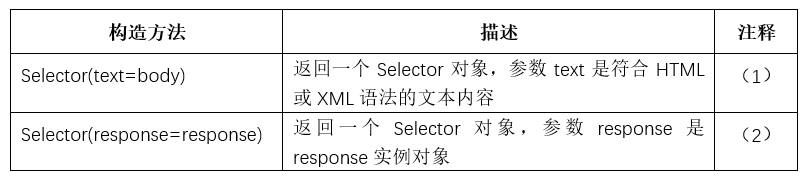
注释(1)
构造方法声明:
Selector(text=body)
该方法返回一个Selector对象,text是关键字参数,传入的实参必须是符合HTML或XML语法的文本内容。
案例代码:
>>> from scrapy.selector import Selector
>>> html = "<div id='images'>\
   <img src='image1_thumb.jpg'/>\
   <img src='image2_thumb.jpg'/>\
   </div>"
>>>#构造Selector实例对象
>>> selector = Selector(text=html)
>>>#从html网页内容中选取图片路径
>>> item_node = selector.xpath('//@src').extract()
>>> print(item_node)
['image1_thumb.jpg', 'image2_thumb.jpg']
>>>
注释(2)
构造方法声明:
Selector(response=response)
从response实例对象中构造一个Selector对象。
案例代码:
def parse(self, response):
   #构造Selector实例对象
  selector = Selector(response=response)
构造Selector实例对象还有另外一种方法,response对象的selector属性就是一个Selector实例对象,在爬虫的回调函数中可以直接使用。
例如:
response.selector.xpath('//div')1、 使用选择器
选择器(Selector)提供了执行Xpath选取、CSS选取和正则表达式选取的方法。
scrapy的shell命令与案例文件
scrapy shell命令提供一个爬虫测试环境,在测试环境中可以爬取指定的网页,并在测试环境中构造response实例对象。
开发者可以利用返回的response实例对象,检测使用xpath表达式、css选择器、正则表达式提取网页内容的正确性。
运行shell命令的语法如下:
scrapy shell url
其中url为要检测爬取内容的网页地址。命令需要在操作系统的shell窗口下运行。若是Windows操作系统,需要在Windows命令行窗口运行。
下面的命令爬取scrapy官方教程提供的网页,并返回response实例对象。
scrapy shell http://doc.scrapy.org/en/latest/_static/selectors-sample1.html
scrapy官方教程案提供的网页内容如下:
<html>
 <head>
  <base href='http://example.com/' />
  <title>Example website</title>
 </head>
 <body>
  <div id='images'>
   <a href='image1.html'>Name: My image 1 <br /><img src='image1_thumb.jpg' /></a>
   <a href='image2.html'>Name: My image 2 <br /><img src='image2_thumb.jpg' /></a>
   <a href='image3.html'>Name: My image 3 <br /><img src='image3_thumb.jpg' /></a>
   <a href='image4.html'>Name: My image 4 <br /><img src='image4_thumb.jpg' /></a>
   <a href='image5.html'>Name: My image 5 <br /><img src='image5_thumb.jpg' /></a>
  </div>
 </body>
</html>
执行上面的命令后,命令会在测试环境中构造response实例对象,对象变量名称为response,开发者可以使用response来执行内容的提取测试任务。
下面给出的案例代码均采用上述命令执行后构造的response实例对象。
Selector类提供的方法如下表所示:

注释(1)
方法声明:
xpath(query)
执行xpath查询,参数query为xpath路径表达式,返回SelectorList类型(参见SelectorList类型小节)。
案例代码:
>>> response.selector.xpath('//title/text()')
[<Selector xpath='//title/text()' data='Example website'>]
案例代码提取案例网页内容的title节点下的文本内容,返回的结果是SelectorList类型。
注释(2)
方法声明:
css(query)
执行css查询,参数query为符合css选择器语法的查询语句,返回SelectorList类型。
案例代码:
>>> response .selector.css('title::text')
[<Selector xpath='descendant-or-self::title/text()' data='Example website'>]
'title::text'是符合CSS选择器语法的查询语句,title是标签名称,text是提取对应标签的文本内容,执行成功后返回SelectorList类型。
注释(3)
方法声明:
re(query)
执行正则表达式,匹配response实例对象指向的网页内容,参数query为正则表达式,返回被正则表达式匹配的字符串列表。
案例代码:
>>>response.selector.re('img.*src=\"(.+?\.[a-z]+)')
['image1_thumb.jpg',
  'image2_thumb.jpg',
  'image3_thumb.jpg',
  'image4_thumb.jpg',
  'image5_thumb.jpg'
]
案例代码的正则表达式匹配网页内容的图片路径,匹配项以字符串列表方式返回。
2、 SelectorList对象
selector选择器返回的选取结果是SelectorList类的实例对象,SelectorList类是列表list类的子类,选取的内容项以列表元素存储在SelectorList类的实例对象中,SelectorList类额外提供了一些方法,用于对选取的内容进一步筛选和处理。
SelectorList类提供的方法如下表所示:
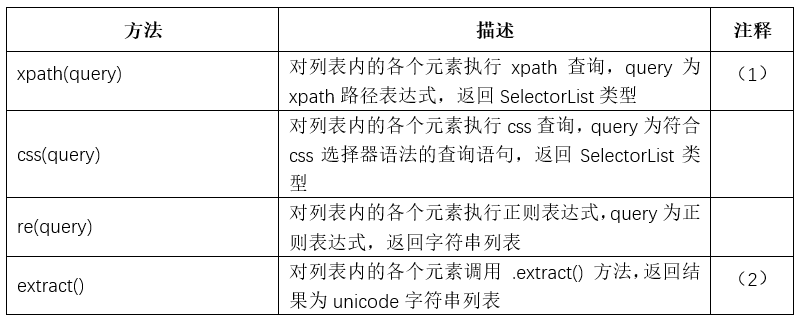
注释(1)
方法声明:
xpath(query)
对列表内的各个元素执行xpath查询,返回结果还是SelectorList类的实例对象,因此SelectorList实例对象可以进行嵌套查询。
案例代码:
>>> links = response.xpath('//a[contains(@href, "image")]')
>>> links.extract()
['<a href="image1.html">Name: My image 1 <br><img src="image1_thumb.jpg"></a>', '<a href="image2.html">Name: My image 2 <br><img src="image2_thumb.jpg"></a>', '<a href="image3.html">Name: My image 3 <br><img src="image3_thumb.jpg"></a>', '<a href="image4.html">Name: My image 4 <br><img src="image4_thumb.jpg"></a>', '<a href="image5.html">Name: My image 5 <br><img src="image5_thumb.jpg"></a>']
>>> for index, link in enumerate(links):
    args = (index, link.xpath('@href').extract(), link.xpath('img/@src').extract())
    print('Link number %d points to url %s and image %s' % args)
Link number 0 points to url ['image1.html'] and image ['image1_thumb.jpg']
Link number 1 points to url ['image2.html'] and image ['image2_thumb.jpg']
Link number 2 points to url ['image3.html'] and image ['image3_thumb.jpg']
Link number 3 points to url ['image4.html'] and image ['image4_thumb.jpg']
Link number 4 points to url ['image5.html'] and image ['image5_thumb.jpg']
>>>
注释(2)
方法声明:
extract()
该方法对列表内的各个列表元素调用extract() 方法提取网页内容,返回结果为字符串列表。因为返回的是字符串列表,因此无法再调用SelectorList类的查询方法。
案例代码:
>>> links = response.xpath('//a[contains(@href, "image")]')
>>> print(links)
[<Selector xpath='//a[contains(@href, "image")]' data='<a href="image1.html">Name: My image ...'>,
 <Selector xpath='//a[contains(@href, "image")]' data='<a href="image2.html">Name: My image ...'>,
 <Selector xpath='//a[contains(@href, "image")]' data='<a href="image3.html">Name: My image ...'>,
 <Selector xpath='//a[contains(@href, "image")]' data='<a href="image4.html">Name: My image ...'>,
 <Selector xpath='//a[contains(@href, "image")]' data='<a href="image5.html">Name: My image ...'>]
>>> print(links.extract())
['<a href="image1.html">Name: My image 1 <br><img src="image1_thumb.jpg"></a>',
 '<a href="image2.html">Name: My image 2 <br><img src="image2_thumb.jpg"></a>',
  '<a href="image3.html">Name: My image 3 <br><img src="image3_thumb.jpg"></a>',
  '<a href="image4.html">Name: My image 4 <br><img src="image4_thumb.jpg"></a>',
  '<a href="image5.html">Name: My image 5 <br><img src="image5_thumb.jpg"></a>']
>>>
从执行结果可以看出,调用extract()方法后,返回的是字符串列表。