在Web应用程序执行过程中,需要动态监听并处理一些发生的事件。例如客户端发送请求到服务器,数据库的连接和释放等。
Java提供了Listener接口,用于监听在Web容器中的运行对象,捕捉这些对象属性的修改或状态的变化,然后针对这些对象的变化做出相应处理。
Servlet规范中定义了八种监听器,这八种监听器的类型及作用如下所述。
ServletContextListener
监听Web应用的启动和销毁事件。
ServletContextAttributeListener
监听Web应用上下文对象的属性改变的事件。
ServletRequestListener
用于监听请求的创建和销毁事件。
ServletRequestAttributeListener
用于监听请求中的属性改变的事件。
HttpSessionListener
会话生命周期监听器,用于监听会话的创建和销毁事件。
HttpSessionActivationListener
会话激活和钝化事件监听器,用于监听会话的激活和钝化的事件。
HttpSessionAttributeListener
会话属性事件监听器。用于监听会话中的属性改变的事件。
HttpSessionBindingListener
会话值绑定事件监听器,该监听器可以不需要在web.xml中进行配置。
编写监听器程序只需实现上面对应的接口即可,在使用监听程序时,Web 服务器会根据监听器所实现的接口,把它注册到被监听的对象上,当触发了某个对象的监听事件时,Web 容器将会调用 Servlet 监听器与之相关的方法对事件进行处理,实现监听器程序的Java类需要在web.xml内进行配置。
例1:编写一个监听器类,统计网站在线人数
具体实现方法:监听器分别实现ServletContextListener、HttpSessionAttributeListener和HttpSessionListener监听接口,重写attributeAdded、contextInitialized和sessionDestroyed方法。
contextInitialized方法
当web容器启动时该方法会被调用,在该方法内可以进行监听器的初始化工作。案例代码首先获取ServletContext上下文环境对象,然后调用ServletContext实例对象的setAttribute方法,添加"online"属性,该属性的值是一个String列表对象,用来存储登录系统的用户。
attributeAdded方法
当向被监听对象中增加一个属性时,web容器就调用事件监听器的attributeAdded方法进行响应,这个方法接收一个事件类型的参数,监听器可以通过这个参数来获得正在增加属性的对象和被保存到域中的属性对象,该方法传入HttpSessionBindingEvent实例对象,通过该对象可以获取绑定到Session对象,如登录的用户名。
案例代码首先获取前面添加到ServletContext上下文环境对象"online"属性对象,然后判断当前绑定到Session的对象名称是否为“username”,若是获取该对象值,添加到online属性对象。
sessionDestroyed方法
当用户退出系统或关闭浏览器时,若监听器实现了HttpSessionListener接口,该方法会被调用,该方法传入HttpSessionEvent实例对象,监听器可以通过这个参数来获得绑定到该会话的对象。
案例代码获取前面添加到ServletContext上下文环境对象"online"属性对象,应用HttpSessionEvent实例对象获取当前退出系统的用户名称,并从"online"属性对象删除。
在项目com.example包下新建listener包,在包下新建WebLineListener.java文件。
程序清单 WebLineListener.java
public class WebLineListener implements ServletContextListener, HttpSessionAttributeListener, HttpSessionListener {
    private ServletContext application = null;
    //往会话中添加属性时回调的方法
    public void attributeAdded(HttpSessionBindingEvent httpSessionBindingEvent) {
        //取得用户名列表
        List<String> online = (List<String>) this.application.getAttribute("online");
        if ("username".equals(httpSessionBindingEvent.getName())) {
            //将当前用户名添加到列表中
            online.add((String) httpSessionBindingEvent.getValue());
        }
        //将添加后的列表重新设置到application属性中
        this.application.setAttribute("online", online);
    }
    //应用上下文初始化会回调的方法
    @Override
    public void contextInitialized(ServletContextEvent servletContextEvent) {
        //初始化一个application对象
        this.application = servletContextEvent.getServletContext();
        //设置一个列表属性,用于保存在线用户名
        this.application.setAttribute("online",new LinkedList<String>());
    }
    //会话销毁时会回调的方法
    @Override
    public void sessionDestroyed(HttpSessionEvent httpSessionEvent) {
        //取得用户名列表
        List<String> online = (List<String>) this.application.getAttribute("online");
        //取得当前用户名
        String username = (String) httpSessionEvent.getSession().getAttribute("username");
        //将此用户名从列表中删除
        online.remove(username);
        //将删除后的列表重新设置到application属性中
        this.application.setAttribute("online", online);
    }
 }案例代码处理客户端的登录请求,提取客户端传入的表单参数“username”的值,将该值设置到Session会话,并获取当前登录系统的用户列表,格式化HTML串,最后返回HTML串到客户端。
在项目listener包下新建LogoutServlet.java文件,实现用户退出系统的Servlet。
程序清单 LogoutServlet.java
@WebServlet(name = "logoutServlet", value = "/logout")
public class LogoutServlet extends HttpServlet {

    @Override
    public void init() throws ServletException {
        //初始化处理代码
    }

    @Override
    protected void doGet(HttpServletRequest req, HttpServletResponse resp) throws ServletException, IOException {
        //设置响应内容类型
        req.setCharacterEncoding("utf-8");
        //销毁会话,会触发SessionLinstener中的sessionDestroyed方法
        req.getSession().invalidate();
        //从应用上下文中获取在线用户名列表
        List<String> online = (List<String>)getServletContext().getAttribute("online");
        resp.setContentType("text/html;charset=utf-8");
        PrintWriter out = resp.getWriter();
        out.println("<html>");
        out.println("<head><title>用户列表</title></head>");
        out.println("<body>");
        out.print("<h3>在线用户列表</h3>");
        int size = ((online == null) ? 0 : online.size());
        for (int i = 0; i < size; i++) {
            if (i > 0) {
                out.println("<br />");
            }
            out.println(i + 1 + "." + online.get(i));
        }
        out.println("<hr><a href=\"index.jsp\">主页</hr>");
        out.println("</body>");
        out.println("</html>");
        out.flush();
        out.close();
    }
    @Override
    public void destroy() {
        //释放资源处理代码
    }
}
在项目listener包下新建LoginServlet.java文件,实现用户登录系统的Servlet。
程序清单 LoginServlet.java
@WebServlet(name = "loginServlet", value = "/login")
public class LoginServlet extends HttpServlet {
    @Override
    public void init() {
        //初始化处理代码
    }
    @Override
    protected void doPost(HttpServletRequest req, HttpServletResponse resp) throws ServletException, IOException {
        //设置响应内容类型
        req.setCharacterEncoding("utf-8");
        //获取请求参数中的用户名
        String username = req.getParameter("username");
        //往Session中添加属性
        //会触发HttpSessionAttributeListener中的attributeAdded方法
        if (username != null && !username.equals("")) {
            req.getSession().setAttribute("username", username);
        }
        //从应用上下文中获取在线用户名列表
        List<String> online = (List<String>) getServletContext().getAttribute("online");
        resp.setContentType("text/html;charset=utf-8");
        PrintWriter out = resp.getWriter();
        out.println("<html>");
        out.println("<head><title>用户列表</title></head>");
        out.println("<body>");
        out.println("当前用户是:" + username);
        out.println("<hr/><h3>在线用户列表</h3>>");
        int size = ((online == null) ? 0 : online.size());
        for (int i = 0; i < size; i++) {
            if (i > 0) {
                out.println("<br />");
            }
            out.println(i + 1 + "." + online.get(i));
        }
        //注意:要对连接URL进行自动重写处理
        out.println("<hr/><a href=\"" + resp.encodeURL("logout") + "\">注销</a>");
        out.println("</body>");
        out.println("</html>");
        out.flush();
        out.close();
    }

    @Override
    public void destroy() {
        //释放资源代码
    }
}
案例代码首先调用request对象的getSession()方法获取Session对象,调用Session对象的invalidate()方法销毁Session,此时监听器的sessionDestroyed()方法被调用,该用户从用户列表中删除。最后获取当前登录系统的用户列表,格式化HTML串,返回HTML串到客户端。
在项目webapp目录下,建立login.jsp。
程序清单 login.jsp
<%@ page contentType="text/html;charset=UTF-8" language="java" %>
<html>
<head>
    <title>Title</title>
</head>
<body>
<form action="login" method="post">
    用户名:<input type="text" name="username">
    <input type="submit" value="登录">
    <br />
    <br />
</form>
</body>
</html>
打开web.xml配置文件,配置WebLineListener监听器。在web-app标签下添加listener子标签。
<listener>
    <listener-class>com.example.listener.WebLineListener</listener-class>
</listener>
JSP代码为用户提供一个简单的表单,处理表单请求的action为LoginServlet,代码中的"login"是LoginServlet的映射路径。
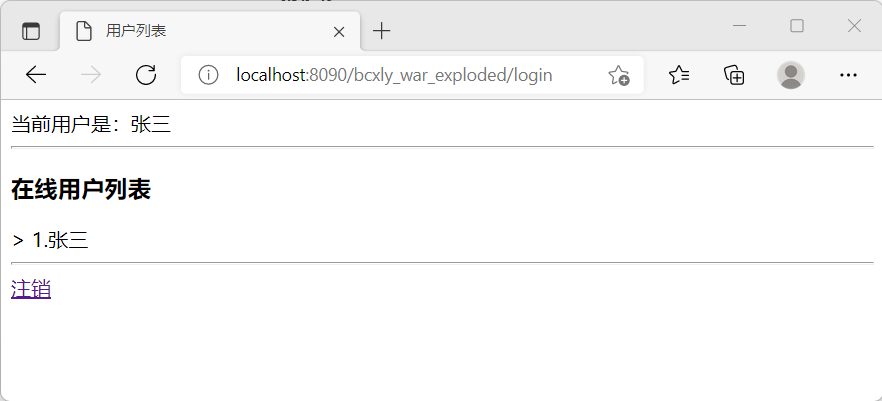
启动Services服务,运行login.jsp,运行结果如下图所示: