
AspectJ是一个面向切面编程的框架,使用AspectJ不需要改动Spring配置文件,就可以实现Spring AOP功能。本篇结合实际案例详细讲述使用AspectJ实现AOP功能。通过本篇的学习,可以解决如下问题。
● 使用AspectJ技术的背景是什么?
● 在不修改原有业务代码的情况下,如何设置业务拦截点?
1、 使用AspectJ技术的背景
在使用AspectJ之前,需要确定项目已经引入了AspectJ相关Jar包,并且AspectJ的版本要兼容JDK、Spring框架的版本,使用不兼容的版本会导致程序报错。
课程案例SpringProgram项目使用的JDK版本是1.8,Spring框架版本是5.08。需要引入的AspectJ相关Jar包如下所示。
● aspectj-1.8.9
● aspectjweaver-1.8.9
关于AOP实现原理在《详解Spring框架的AOP机制》一文中已经详细描述,这里不再赘述。不过本文的AOP项目案例还是借鉴《详解Spring框架的AOP机制》一文中的案例。因为Spring框架提供了AspectJ 注解方法和基于XML架构的方法来实现AOP,在《详解Spring框架的AOP机制》中,重点介绍了基于XML架构的方法来实现AOP,本文将重点介绍利用AspectJ 注解方法实现AOP。用同一个案例采用两种不同的实现方法,既可以加深对AOP的理解,也可以对两种实现技术进行对比,可以选择适合自己的一种技术来实现AOP。
在课程案例SpringProgram项目中,一个业务流程是校长通过邮件发送上课通知给老师。校长执行该业务时,业务系统并没有对老师进行验证。现在要求校长在发送通知之前,需要对老师进行用户验证。
具体要求是在尽量不改变原有业务代码的情况下,加入老师验证功能。原有业务代码如下。
package com.milihua.springprogram.business;
import org.springframework.context.ApplicationContext;
import com.milihua.springprogram.entity.AopTeacher;
import com.milihua.springprogram.notice.AopEmailNotice;

public class AopPrincipal {
/*
  基于Spring IOC容器的校长类,从配置文件获取通知组件
**/
public String  notifyTeacher(ApplicationContext ctx)
{
    StringBuilder  notifyReturn = new StringBuilder();

    //从容器中获取通知张老师的组件
    AopEmailNotice  noticeZhang = ctx.getBean("eamilNoticeZhang",AopEmailNotice.class);
    noticeZhang.sendMessage();
    //从容器中获取张老师的实例
    AopTeacher  teacherZhang = ctx.getBean("teacherZhang",AopTeacher.class);
    noticeZhang.setTeacher(teacherZhang);
    notifyReturn.append(teacherZhang.getNotify() + "<p>")
    return  notifyReturn.toString();
}

}
分析上面的业务代码,可以考虑在执行setTeacher之前加入老师的验证方法,并将老师对象teacherZhang作为参数传给验证方法。如果能够修改业务代码,可以直接在setTeacher方法之前加入VerifyTeacher验证方法。
VerifyTeacher(teacherZhang);
    noticeZhang.setTeacher(teacherZhang);
由于各种原因,不允许修改原有的业务代码。在这种情况下,可以采用AOP技术,拦截setTeacher方法,在setTeacher方法执行之前、执行之后、抛出异常之后执行拦截方法。拦截方法所在类的称为切面,拦截方法称为切入点。如下图所示。
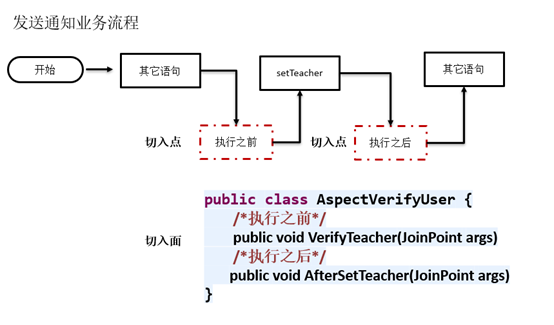
图 1 使用AOP拦截setTeacher方法
2、使用Aspectj拦截setTeacher方法
用基于XML架构的方法来实现AOP,需要在Spring配置文件中配置切面和切入点。使用Aspecj注解技术,不需要在Spring配置文件中配置相关AOP信息,在切面类中加入Aspecj注解即可。
package com.milihua.springprogram.aspect;
import org.aspectj.lang.JoinPoint;
import org.aspectj.lang.annotation.After;
import org.aspectj.lang.annotation.Aspect;
import org.aspectj.lang.annotation.Before;
import org.aspectj.lang.annotation.Pointcut;
import com.milihua.springprogram.entity.AopTeacher;
@Aspect
public class AspectVerifyUser {
@Pointcut("execution(* com.milihua.springprogram.notice.AopEmailNotice.setTeacher(..))")
private void VerifyUser() {}
@Before("VerifyUser()")
public void VerifyTeacher(JoinPoint args) {
    System.out.print(args.getTarget());
    AopTeacher teacher = (AopTeacher)args.getArgs()[0];
    System.out.printf("%s 验证成功", teacher.getName());
    System.out.println();
}

@After("VerifyUser()")
public void AfterSetTeacher(JoinPoint args) {
    System.out.print(args.getTarget());
    AopTeacher teacher = (AopTeacher)args.getArgs()[0];
    System.out.printf("%s 执行成功", teacher.getName());
}

}
AspectVerifyUser类用于验证老师身份,如果不加Aspecj注解,AspectVerifyUser类只是一个普通的Java类,不能被AOP调度使用。要使AspectVerifyUser类作为切面使用并拦截setTeacher方法,实现执行setTeacher方法之前先执行VerifyTeacher方法,在setTeacher方法执行成功后,再执行AfterSetTeacher方法。就需要在AspectVerifyUser类中添加Aspecj注解。
添加@Aspect注解
在类头部加@Aspect注解,使AspectVerifyUser类成为切面类,并被AOP识别和加载。作用类似于在Spring配置文件中的AOP标签<aop:config>。
添加 @Pointcut注解
在类方法头部加@Pointcut注解,使该方法称为一个切入点。@Pointcut注解的execution表达式定义该方法在什么位置切入。
例如:
@Pointcut("execution(* com.milihua.springprogram.notice.AopEmailNotice.setTeacher(..))")
private void VerifyUser() {}
@Pointcut注解指示AOP将VerifyUser()方法作为切入点,切入到AopEmailNotice类的setTeacher位置,传入的参数为任意类型和数量,VerifyUser()为空函数,实际执行的函数通过@Before、@After、@Around等注解与VerifyUser()方法关联。
再如:
@Pointcut("* com.milihua.springprogram.notice. .*.*(..)")
private void VerifyUser() {}
@Pointcut注解指示AOP将VerifyUser()方法作为切入点,切入到com.milihua.springprogram.notice包及子包下所有的类及类中所有的方法。
又如:
@Pointcut("* com.milihua.springprogram.notice. *.*(..)")
private void VerifyUser() {}
@Pointcut注解指示AOP将VerifyUser()方法作为切入点,切入到com.milihua.springprogram.notice包下所有的类及类中所有的方法。
添加 @{ADVICE-NAME}注解
@{ADVICE-NAME}为声明建议注解,也可以称之为通知注解。该注解添加到实际执行函数的头部,并与切入点的名称进行关联。
@{ADVICE-NAME}有五种注解,分别是@Before、@After、@Around、@AfterReturning、@AfterThrowing。被@Before注解的方法在被切入方法执行之前执行;被@After注解的方法在被切入方法执行之后执行,不考虑是否执行成功;被@AfterReturning注解的方法在被切入方法执行成功之后执行,当被切入方法发生异常时,该方法不被执行;被@Around注解的方法在被切入方法执行之前和执行之后都执行;被@AfterThrowing注解的方法,只有当被切入方法执行过程发生异常时才会执行。
例如:
@Before("VerifyUser()")
public void VerifyTeacher(JoinPoint args) {
    System.out.print(args.getTarget());
    AopTeacher teacher = (AopTeacher)args.getArgs()[0];
    System.out.printf("%s 验证成功", teacher.getName());
    System.out.println();
}
VerifyTeacher方法头部被@Before("VerifyUser()")注解,该方法在被切入的setTeacher方法之前执行。
获取通知参数
切入方法如何获取被切入方法传递过来的参数呢?例如,AspectVerifyUser类的VerifyTeacher方法切入到AopEmailNotice类的setTeacher方法,VerifyTeacher需要获取setTeacher方法的AopTeacher类参数,用于对老师进行用户验证。
AOP使用org.aspectj.lang.JoinPoint类型,用于获取被切入点传入的参数,任何切入方法的第一个参数都可以是JoinPoint。JoinPoint结构如下。
package org.aspectj.lang;
    import org.aspectj.lang.reflect.SourceLocation;
    public interface JoinPoint {
        String toString();         //连接点所在位置的相关信息
        String toShortString();     //连接点所在位置的简短相关信息
        String toLongString();     //连接点所在位置的全部相关信息
        Object getThis();         //返回AOP代理对象
        Object getTarget();       //返回目标对象
        Object[] getArgs();       //返回被通知方法参数列表
        Signature getSignature();  //返回当前连接点签名
        SourceLocation getSourceLocation();//返回连接点方法所在类文件中的位置
        String getKind();        //连接点类型
        StaticPart getStaticPart(); //返回连接点静态部分
}
其中,getArgs方法可以获取被切入点方法参数列表,根据参数列表可以获取传入的参数。
在课程案例SpringProgram项目中,添加aspec.xml,配置AspectVerifyUser类。
<?xml version="1.0" encoding="UTF-8"?>
<beans xmlns="http://www.springframework.org/schema/beans"
       xmlns:xsi="http://www.w3.org/2001/XMLSchema-instance"
       xmlns:aop="http://www.springframework.org/schema/aop"
       xmlns:context="http://www.springframework.org/schema/context"
       xmlns:p="http://www.springframework.org/schema/p"
       xsi:schemaLocation="http://www.springframework.org/schema/beans
       http://www.springframework.org/schema/beans/spring-beans.xsd
        http://www.springframework.org/schema/aop
        http://www.springframework.org/schema/aop/spring-aop-2.0.xsd
        http://www.springframework.org/schema/context
ttp://www.springframework.org/schema/context/spring-context.xsd">
    <aop:aspectj-autoproxy  proxy-target-class="true"/>
    <bean id="teacherZhang" class="com.milihua.springprogram.entity.AopTeacher">
        <property name="name" value="张老师"></property>
    </bean>
    <bean id="eamilNoticeZhang"  class="com.milihua.springprogram.notice.AopEmailNotice" p:teacher-ref="teacherZhang" >
        <property name="message" value="8:45上语文课"></property>
    </bean>
    <!-- Definition for VerifyUser aspect -->
    <bean id="VerifyUser" class="com.milihua.springprogram.aspect.AspectVerifyUser"/>
  </beans>
在课程案例SpringProgram项目中,添加测试类。
package test;
import org.springframework.context.ApplicationContext;
import org.springframework.context.support.ClassPathXmlApplicationContext;
import com.milihua.springprogram.business.AopPrincipal;
public class AspecttTest {

public static void main(String[] args) {
    // TODO Auto-generated method stub
    ApplicationContext context = new ClassPathXmlApplicationContext("config/aspec.xml");
    //声明校长类,并发送通知
    AopPrincipal aopPrincipal = new AopPrincipal();
    String notifyReturn = aopPrincipal.notifyTeacher(context);
    System.out.println(notifyReturn);
}

}
课程小结
(1)本篇探讨了使用AspectJ技术的背景。当原有业务流程需要添加事务处理、安全控制、性能统计、异常处理等功能时,可以使用AspectJ技术在不修改原有业务代码的情况下,将上述功能切入到业务流程中;在构建新的系统时,也可以将上述功能独立考虑,再通过AspectJ技术将它们集成到系统中。
(2)本篇也通过案例讲述了应用AspectJ技术实现AOP的过程,具体实现步骤是:首先编写需要切入业务流程的独立模块(也称为切面)和切入点(模块中的方法),并添加AspectJ相关注解,确定切入的位置;然后在Spring配置文件中配置新添加的切面Bean,无需配置AOP信息;最后编写测试代码。